


Clean Up Phone Storage: CleanX
4.4831.00 Reviews
App Specs
- Version
- 1.0.6
- Updated On
- License
- Free
- Downloads
- 1,000,000+
- Developer
- TapSuite
- Categories
- Tools
- Platform
- Android
Screenshots
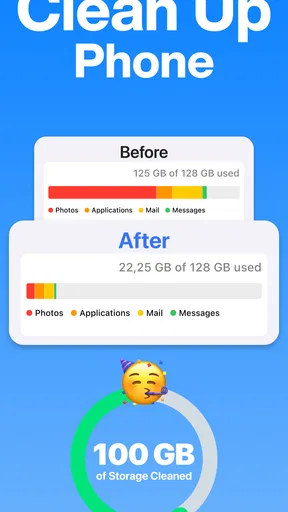
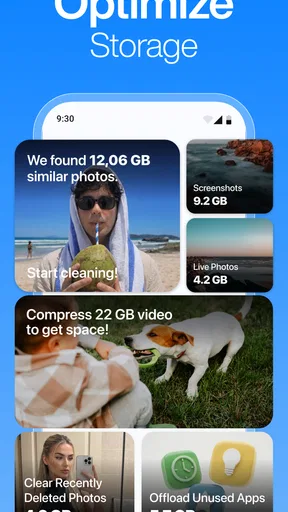
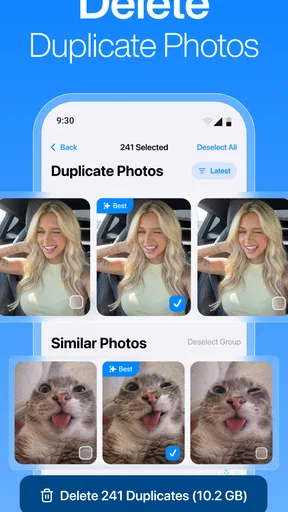

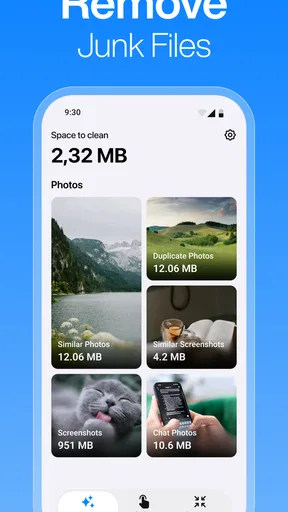


 Analysis by AppCompare
Before I decide whether a cleaner belongs in my routine, I ask a practical question: can I tell what it wants me to review, and can I comfortably leave something untouched? That matters with CleanX, which brings photo cleanup, duplicate removal, junk-file clearing, and email tidying into one tools app. The range can help when several kinds of clutter pile up at once, but it also makes careful navigation more important than simply working through a queue quickly.
In an ordinary week, I might notice my photo library is hard to browse, find redundant downloads while looking for a document, and see an inbox full of messages I no longer need. Having those chores gathered in one place is appealing, especially if I prefer a single starting point over several separate utilities. I would still treat each category as a different decision: an old email, a duplicate-looking picture, and an unfamiliar file do not carry the same risk if removed.
Who benefits most from one cleanup starting point
I think CleanX is best suited to someone who wants a guided place to begin routine maintenance and is willing to review candidates rather than approve a sweeping cleanup without looking. It may be especially convenient for people who use their phone for both photos and email and find it easier to tackle small chores in one session. It is less compelling if one specific task is all you need to solve, or if you already know and prefer the controls in your phone’s built-in apps.
For example, before a weekend away, I might want to make room without risking the photos I plan to take. I would open one area, check a few obvious candidates, and stop as soon as I have addressed the immediate need. I would not try to clean photos, files, and email in one hurried sweep. Keeping the task narrow makes it easier to remember what I have reviewed and to notice when a suggested item deserves a closer look.
That approach also helps answer a common practical concern: does using a cleaner mean I should let it make every decision? I would not. The value here is having several cleanup jobs available from one starting point, not treating every recommendation as a command. If I cannot tell why an item has been surfaced, I would leave it alone and use a familiar gallery, file manager, or mail app to inspect it in context.
I judge phone-cleanup tools less by how much clutter they promise to remove and more by how confidently I can decide what stays. CleanX brings several common chores—sorting unwanted photos, dealing with duplicates and junk files, and tidying an email inbox—under one roof. That breadth can be useful when storage pressure and inbox clutter arrive together, but it also makes clear navigation and careful review especially important. My main question is whether the app helps different people approach those chores comfortably, rather than simply encouraging them to clear things quickly.
CleanX is a free tools app from TapSuite, with optional in-app purchases listed from $7.99 to $39.99 per item. It is rated for Everyone and runs on devices using operating system version 11 or later. The current release is version 1.0.6. Those details make it worth considering for a broad range of users, although a general age rating should not be mistaken for proof that every interaction is equally easy for every ability or situation.
Worth Reading Before You Choose

Flipboard Shows What News Apps Must Do Beyond the Feed

Switching to Android Auto Means Rethinking Your Driving Routine

Google Calendar Makes a Crowded Week Easier to Manage

Ludo King Makes the Most of the Minutes Between Plans

Baby Panda World Brings Quick Play to Modern Phones, but Its Game Library Feels Busy

ESPN’s Live Game View Makes Following Close Games Easier
Finding your way through a cleanup
I find it easier to judge a cleanup tool when I can approach it in a small, low-stakes step rather than commit to a full sweep. Starting with one clearly bounded task can show whether the app’s flow feels understandable and manageable, while leaving room to pause if a choice is unclear. That first impression is especially useful before considering how different people navigate and review personal content.
Several chores, one place to start
The appeal I see in CleanX is its combination of photo cleanup, duplicate removal, junk-file clearing, and email tidying. Instead of opening a separate tool for each kind of clutter, I can treat the app as a starting point for a short maintenance session. That is particularly handy when I know my phone feels messy but have not yet worked out whether the bigger annoyance is a crowded photo library, redundant files, or an inbox that has become difficult to scan.
That all-in-one approach also creates a navigation challenge. Photos, files, and email are different kinds of personal material, and the safest workflow is not identical for each. A useful cleanup tool needs to make it apparent which area I am working in and what kind of action I am about to take. I would approach CleanX one task at a time rather than treat the whole phone as a single pile of disposable clutter.
In a typical everyday situation, imagine trying to make room before leaving home for a weekend. I would begin with the part of the app that addresses the most immediate problem, review its suggestions, and only then move to another category. If photos are the priority, I would inspect potential duplicates before touching broader file cleanup. That order matters: two similar-looking pictures might be alternate shots I want to keep, while a duplicate file may be easier to judge once I have checked its context.
Readability is more than a tidy screen
For me, readable cleanup software is not just software with large-looking labels. It should make the consequences of an action understandable before I commit, distinguish a suggestion from a completed deletion, and avoid turning a review into a race. This matters especially when the app deals with photos and email, where a mistaken removal can be more frustrating than leaving a little clutter behind.
I would therefore use CleanX in deliberate passes: open one cleanup area, examine what it identifies, pause on anything that looks uncertain, and leave the rest for later. This is a practical safeguard even for people who do not have a vision or attention-related need. A shorter, focused session is easier to follow than trying to clear photos, files, and messages all at once.
The app’s scale suggests that many people have chosen to try it: CleanX has more than a million installs, a 4.4 average rating, and around 79 thousand ratings. Those figures are useful context for a prospective user, but they cannot tell me whether the interface will suit a particular person. My own standard is simpler: can I tell what I am reviewing, and can I stop before an uncertain choice becomes a permanent one?
Motor and sensory comfort
Cleanup often involves repeated taps and visual comparison. That can be tiring for someone with limited dexterity, hand pain, tremor, or a preference for fewer interactions. When reviewing similar photos or files, I would avoid making rapid selections; slower, separate decisions reduce the chance that an unintended tap removes something important. If precise touch selection is uncomfortable, it may be better to handle only a small batch and use the phone’s built-in controls where they feel easier.
Sensory comfort matters too. A phone-cleaning session can become visually demanding if the user has to compare many similar items or move between different kinds of content. I would not recommend starting when tired, rushed, or already overwhelmed by notifications. Choose one task, set a modest stopping point, and return later if the review becomes hard to track. That is not a special feature of CleanX; it is a sensible way to reduce mistakes in any tool that asks you to judge personal material.
People who rely on screen readers, magnification, switch access, voice control, or other assistive methods should evaluate the app on their own device before trusting it with a large cleanup. I cannot infer how well a particular assistive setup works simply from the app’s category or age rating. A low-risk first session—checking a small set of items without committing to removal—can reveal whether the controls and feedback fit the way someone uses their phone.
Using it in different situations
CleanX is most useful when I have enough time and attention to review what it brings forward. At home, with a few quiet minutes, it can serve as a central place to tackle one source of clutter. On a commute, in bright sunlight, or while juggling other tasks, detailed visual comparisons may be less comfortable. I would save decisions about personal photos and important email for a calmer moment rather than clean by tapping through suggestions in a hurry.
There is also a useful distinction between clearing space and organizing a digital life. Removing redundant material can address an immediate storage problem, but it does not replace a considered photo-organizing routine or email habits such as archiving messages I may need later. I would use CleanX for targeted maintenance, not assume that one cleanup session will keep everything orderly indefinitely.
If I were helping a family member who finds phone settings confusing, I would not begin by handing over a broad cleanup task and asking them to approve everything. I would sit together, choose one category, and explain the difference between reviewing a candidate and confirming its removal. That small change makes the process more understandable and gives the person control over what happens to their own content.
Where caution and alternatives make sense
The main trade-off is that a multi-purpose cleaner can make several jobs easier to reach without necessarily being the best place for every decision. For careful photo management, the phone’s own gallery may be preferable because it is already familiar and lets the user judge images in their usual context. For email, the existing mail app may be better when someone depends on its established folders, search, or accessibility workflow. CleanX makes more sense when having a shared starting point is valuable; a dedicated tool can be preferable when one task demands more control.
I would also be cautious about treating a cleanup recommendation as an instruction. A duplicate-looking image may preserve a different crop or moment, and a file that seems unnecessary may belong to an app or project the user still needs. The practical tip is to review in small groups and keep anything whose purpose is unclear. The time saved by deleting aggressively is rarely worth the hassle of trying to recover a personal item later.
CleanX is free to install, while optional purchases range from $7.99 to $39.99 per item. I would check the purchase choices in the app before building a routine around any paid capability, and decide whether the free experience already handles the chores I care about. For someone who only occasionally deletes a few pictures, the phone’s built-in tools may be sufficient. For someone who wants a single place to approach photos, duplicates, junk files, and email clutter, trying the free app first is a more measured choice than paying before finding a real need.
A considered choice for inclusive cleanup
CleanX has a practical idea at its core: make several common forms of digital clutter easier to address from one tools app. TapSuite’s product has attracted a substantial audience, and its Everyone rating makes it broadly positioned, but neither popularity nor a general content rating guarantees a comfortable experience for every user. What I value most is the possibility of handling different cleanup jobs without hunting through unrelated utilities, provided I keep control of each decision.
I would recommend CleanX to people who want a convenient place to begin a careful phone-and-inbox tidy-up and are comfortable reviewing suggested items themselves. I would steer away from it—or use it only with support—if someone needs a fully predictable assistive-technology experience, finds repeated visual comparisons difficult, or would rather keep all cleanup inside familiar system apps. In those cases, the built-in photo, file, or mail tools may be a better fit.
My practical verdict is to try one small, low-stakes cleanup first and pay attention to how understandable and comfortable the process feels. Keep the pace slow, verify anything personal, and stop when the review becomes tiring. Used that way, CleanX can be a useful organizer for routine maintenance; used as a button to erase everything that looks unnecessary, it is not the shortcut I would trust.
Choosing a first task without creating more work
One useful way to test whether CleanX fits your habits is to choose a task with a clear boundary. Rather than begin with the entire photo collection, I would look for a small group of obvious repeats or deal with one pocket of inbox clutter. That gives me a chance to learn how the app presents items and actions before the stakes rise. If I find myself unsure what a control will do, I can stop and switch to the familiar app that normally handles that content.
This approach is also kinder to people who share a device or help someone else manage one. The person whose photos or messages are being reviewed should remain part of the decision, rather than having another user make broad selections on their behalf. A shared screen and a few explained choices can make cleanup feel collaborative instead of rushed or mysterious.
I would skip CleanX as my main solution if I need a highly specialized photo workflow, rely on particular mail-app organization, or cannot comfortably inspect each proposed change. A system tool may take longer to open, but familiarity can be more valuable than convenience when the content is personal. The right choice depends less on how many categories an app covers and more on whether its review process fits the user’s confidence, pace, and access needs.
My inclusive verdict
CleanX is a sensible option for someone who wants a shared entry point for several maintenance chores and is prepared to make the final calls themselves. Its strongest case is convenience across different kinds of clutter; its main caution is that convenience should not replace careful checking. I would start small, use it when I can concentrate, and keep the phone’s familiar gallery and mail tools available whenever they provide a clearer or more comfortable way to decide.
Pros
- Quickly identifies large files that may be taking up storage.
- Simple layout makes storage cleanup easy to navigate.
- Can help spot duplicate or similar photos.
- Useful for reviewing files before deciding what to remove.
- Offers a convenient way to organize a cluttered photo library.
Cons
- Review suggested items carefully to avoid deleting files you want to keep.
- Cleanup results depend on the files and permissions available on your device.
- Some features may require a subscription or in-app purchase.
- Photo analysis can take time when your library is large.
- Storage space may not increase much if your device has few removable files.
FAQs for Clean Up Phone Storage: CleanX
What does Clean Up Phone Storage: CleanX do?
Clean Up Phone Storage: CleanX is a phone-cleaning utility intended to help users review storage and identify items that may be taking up space, such as duplicate or unwanted photos and other files. Its exact tools can vary by app version and device. Check the in-app descriptions before using any cleanup option, since a cleaner cannot safely determine that every file is unnecessary for you.
Can CleanX delete files or photos I want to keep?
It can, if you select items for removal without checking them first. Before confirming a cleanup, review the files and photos shown, and avoid deleting anything you do not recognize or may need later. Where available, use a preview or selection screen rather than an automatic removal option. Backing up important photos and documents before cleaning is a sensible precaution.
Does Clean Up Phone Storage: CleanX actually increase available storage?
It may help you reclaim space when it identifies files you choose to remove, but results depend on what is stored on your phone and which features the current version provides. It cannot expand your device’s physical storage, and it may not clear data controlled by other apps or the operating system. Check your phone’s storage settings afterward to confirm what changed.
Is Clean Up Phone Storage: CleanX free, and are there subscriptions or ads?
Pricing, advertisements, and access to premium tools can differ by platform, region, and app version. Review the app-store listing and the purchase or subscription screen before starting a trial or paying for an upgrade. If you begin a subscription, check its renewal terms and cancellation instructions in your Apple or Google account settings; uninstalling the app may not cancel billing.
What permissions and privacy details should I check before installing CleanX?
A storage-cleaning app may request access to photos, media, or files so it can scan and manage content. Grant only permissions needed for features you intend to use, and read the current privacy policy and store disclosures to understand what data may be collected, processed, or shared. Permission names and privacy practices can change with updates, so verify them before installing or enabling optional features.


